
Orders and Financial Documents Module
The order management module in Kiero OMS serves as the central operational hub for your online store. It aggregates transactions from all integrated sales channels (Allegro, Etsy, WooCommerce) into a single, unified dashboard, eliminating errors and drastically speeding up post-sale operations.
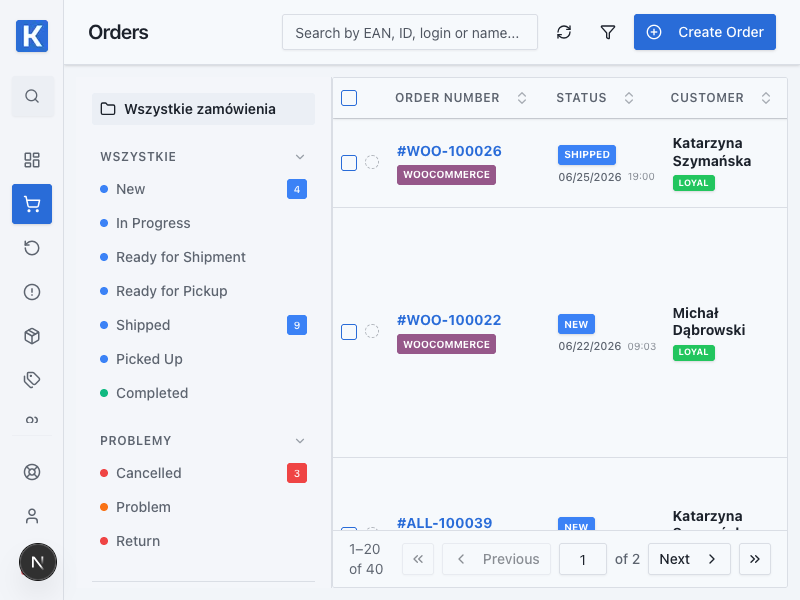
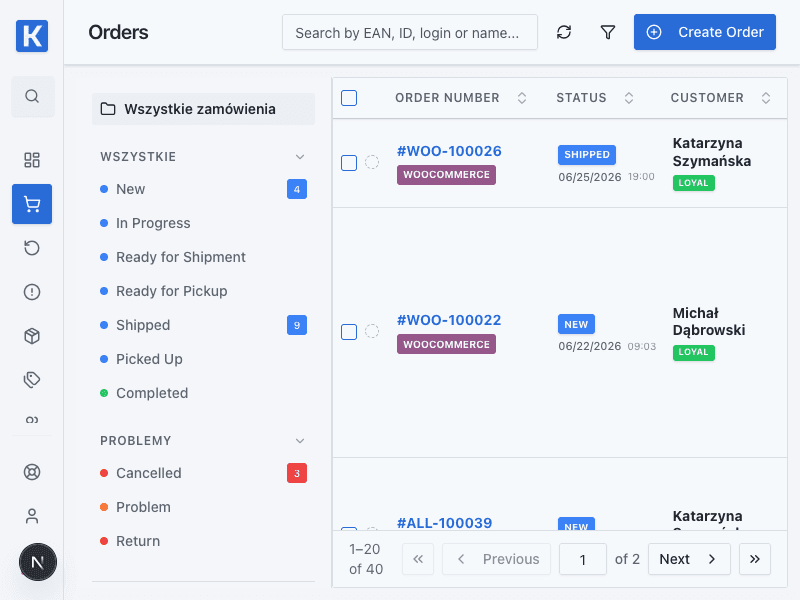
From the order list you can open details, prepare shipping, and monitor fulfilment status.
1. What's Included in the Module?
- Central Order List: All orders from different platforms in one place with a shared status workflow.
- Shipment Creator: Direct integration with shipping carriers (InPost, Furgonetka, Wysyłam z Allegro) for instant waybill generation.
- Automated Invoicing System: Integration with accounting systems (Fakturownia.pl, Scanye) for bulk generation of VAT invoices (B2B) and personalized receipts without NIP (B2C).
- Multi-Entity Support: Ability to map different legal entities (companies) to specific sales channels and invoice them under a single account.
- Kiero Print Agent: A desktop utility for instant printing of shipping labels and invoices without the need to manually download PDF files.
2. What Can You Do as a Merchant?
- Bulk Label Generation: Select multiple orders and generate labels for various courier services simultaneously with a single click, utilizing predefined package dimensions.
- Flexible VAT Setup: Easily configure tax rates (23%, 8%, 5%, 0% and exemptions) for domestic shipping and cross-border transactions (OSS procedure).
- No Fiscal Printer Required: Enable automated generation of personalized B2C invoices instead of fiscal receipts for individual buyers. This allows you to legally operate without the costs of purchasing and servicing a fiscal cash register.
- Shipment Tracking: Monitor the delivery status of your packages directly inside the order card.
3. What Do You Get? (Business Value and ROI)
- Fewer manual steps: Labels, financial documents, status updates and printing can be handled in one order workflow. Actual processing time depends on configuration, carrier and automation scope.
- Financial Savings: A built-in double-label lock prevents generating a second shipping label for the same order in case of a warehouse employee's mistake, avoiding redundant courier charges.
- Increased Customer Satisfaction: Buyers receive tracking information and purchase documents almost immediately after their order is packaged.
4. Automation Capabilities (Automations)
Automation in Kiero OMS takes care of repetitive, routine tasks:
- Automated Document Generation: When an order status changes to "Paid" (or "Ready for Dispatch"), the system automatically sends a request to Fakturownia or Scanye, generates the VAT invoice/personal invoice, and saves it.
- Automated Invoice Upload to Marketplace: Immediately after an invoice is generated, Kiero OMS automatically uploads the PDF file directly to the Allegro API, attaching it to the buyer's purchase history. The buyer can download it directly from their Allegro account, eliminating the need to send emails.
- Automated Label Printing: When a shipping label is generated, Kiero OMS instantly sends a print command to Kiero Print Agent installed on your warehouse PC. The label prints automatically without any manual clicks.
- Delivery Status Synchronization: Once the courier picks up the parcel, the system automatically sends the tracking number and link to Allegro or WooCommerce and marks the order as shipped.
First order-handling workflow
- Open Orders and use the filters to find an order that needs fulfilment.
- Open the order card and check the items, address, and delivery method.
- Confirm the payment status before preparing the shipment.
- Select a carrier and generate the shipping label.
- Check the tracking number and move the order to the next status in your workflow.
- If you use Print Agent, confirm that the document reached the correct printer.
Expected result
The order has a complete address, a delivery method, a generated label, and a saved tracking number.
A label cannot be generated
Check that the carrier is connected, sender details are complete, and the order delivery method is mapped correctly. If you use a shipping broker, also check its balance and service configuration.